Showing posts with label Troy Gutierrez. Show all posts

Sunday, December 4, 2011

Update this!

If you haven't noticed (or if this is your first time visiting) I've redesigned the layout!  Let me know how you like it.  I do have quite a few things to share however: first being I've just uploaded the entire RPM Challenge Album for everyone to download - FREE!

Borderline Soundtrack (16 songs in 192kbps mp3, album art, and readme.txt) - 128 mb zip file

I've got some new fractals I'm working on to add to the Aural Ascendancy series gallery I have.  Those will be going up soon.  I've also been busy drawing up more of my short skit storyboard and working on building the 2nd episode to the RPM Challenge we did back in February.  If you missed the first one:


The last week has been kind of crazy prepping for a last minute shoot in LA that didn't go through but there's still a project to come of that (supposedly).  Harry wanted my help in putting together a plan of attack for doing a timelapse for a corporate video project or just plain to have for whatever the company wants it for.  I did some research just to make sure I was up-to-date on all the options and narrowed it down to 2 options: 1-2 DSLR's with kit lenses; or a few GoPro Hero HD cameras.  I had very little information on the project to go by other than it's for a 3 week construction project.

He asked me to come up with a solution to tackle the time-lapse, and to get ready to go down to LA with Michael Mok on Thursday (just three days later) stay the night a motel and be up early enough to head out to the campus grounds where they are to start construction Friday morning.  Mok and I would set up the time-lapse system and then proceed to get some interview and B-roll footage; wrap up and head back home that same day.

So, I roughly dove into the world of time-lapses and cameras.  My first solution was to keep a budget in mind (which I had no point of reference whatsoever).  My first thought was to check out GoPro as Mok and I had used them on our previous venture for the Reality Series pilot we were shooting for a previously discussed producer (see A Dashboard Confession).

We all know what a time-lapse is so I'll skip the descriptive analysis.  What it comes down to is that The GoPros offer a very affordable solution that's also easy to setup, but somewhat limited on time-lapse management.  The whole situation calls for us to set it up and leave it, and GoPros only run with an SD card.  I ran into these factors that I immediately emailed GoPro about as I was emailing the pitch to Harry:
  • Can I charge and operate them at the same time?
  • What's the longest amount of time I can leave them unattended?
  • How can I manage the media?
The GoPro support team is amazing! Not only were they quick to respond but they took the time and went the extra mile crunching numbers and giving me some great reference points by telling me exactly how many frames at 5-megapixels I would be able to get on a 32gb SD card, and due to the fact that the cameras shoot at 60 second intervals max, a frame every minute if the camera were to shoot around the clock would last only 1 week.

So here was my pitch to Harry as I was contacting GoPro:

Option 1: 
  •   - Retails $200
  The interesting part is that it's a 5 megapixel camera which is more than double the resolution for HDTV 1080p which gives plenty of room for crop and pan movements to spice up the timelapse.  The downside is I'm not sure what the maximum length of time we'd be able to leave them up to capture until I get a response back from GoPro about several questions I asked them.  This solution however would be an affordable way to get multiple cameras up for multiple angles.

Some accessories to consider:
  •  - Retails $50
  • USB AC Charger
  •  - Retails $20
  As i can't find any documentation and am currently contacting GoPro about seeing whether you can charge and use the camera at the same time; this may be a necessary item for each Camera.  The SD Card price is based on their website though i'm sure we can find cheaper elsewhere.   When i contacted GoPro I submitted a question involving whether or not the cameras can be tethered to a computer for storage and capture which would bypass the need for SD cards, I'll let you know the results as soon as I get a response from them.


Option 2:
  12 megapixel camera, kit includes 18-55mm lens which for covering the viewing angle of the landscape we'd want to cover should be more than good enough, Canon lenses are also good quality optics too though we'd have to play a bit with settings before starting timelapse.  The cameras ARE definitely able to hook up to a computer to control the time interval and store the photos away from the camera.  This however does require quite a bit more setup, programming the camera for the best picture mode I can handle well enough but these cameras are quite a bit larger than the GoPro's and will stand out wherever these are put up on campus.  The advantage of having a camera like this is we can greatly control the capture interval for more effective file management.  If we know exactly how long we want the timelapse to be compressed (3 weeks to 2 minutes for example, we can set the interval accordingly with the accessories).

Some Accessories to consider:
  • Camera Armor
    • Retails anywhere from $15 - $50
    • Absolutely necessary for outdoors and on top of this I'd suggest black trash bags to wrap around and cover the camera and only expose the lens (use lens hoods too).  Covering with trash bags should help hide the cameras but I wouldn't rely on it as a theft deterrent.
  • Battery Grip
    • Retails $50 - $80
  • Extra Batteries for Grip
    • Retails $49.99
  • Lens Filters - UV, and possibly others.
  • 32gb SD card or larger
  • OR laptop or computer source to hook up and control remotely for storage and transfer.

  With the DSLR's we'd have to figure out a mounting option for getting the perspectives we might want, I would expect we'd want more bird's eye views or high vantage points as well as something eye level if necessary.  It really depends on the location.  If you have the address perhaps we can look it up on google maps and get an idea of the space we're working with.

  There's advantages to getting either option.  There are other camera systems like PTZ (Pan-Tilt-Zoom) setups where we can completely remotely control them but are VERY costly ($10,000+ when you consider the broadcast and controller equipment just for a single camera).  I think either of these options should be feasible, just depends on what you want to budget.  The GoPros are the most affordable so we COULD get a decent array going for several points of view to cut to and from.  The downside is if we can only capture onboard the maximum interval length is a picture every minute.  Therefore we have (speculatively) very little control over our time-lapse management.    Option 2 with the DSLR's is quite a bit more expensive which may limit our number of POV shots we can get, but may yield MUCH more control over timelapse management and greater quality image capture due to higher resolution.  Another option that the DSLR's give an advantage over is shooting in Canon RAW (much larger file size) to allow for even more vivid image control in post (better contrast and brightness control in case of severe weather and lighting conditions).  The DSLR's however are still considered entry level and are limited on other formats and features like recording HD video (720p max) compared to other higher end models that can better suit other productions later on.  Image quality-wise the picture would be even greater and higher fidelity than the Sony Z1u you currently use now, but due to the resolution restrictions this wouldn't be an ideal camera for productions so flexibility as a production asset would be minimal and very specific.  The GoPros come with all-weather housing and can even go underwater, which make them extremely versatile and affordable.  These can easily come in handy for productions later on if necessary.  Not to mention the accessories like the Wifi bacpac for remotely viewing and controlling the GoPro cameras (this will be available February next year) will make them even more controllable than they are now.
  Let me know if you need further information on anything or have questions about any of this.  This is just a rough outline.  I could also look up some consumer HD Video cameras as alternatives but usually sensor quality is poor compared to the DSLR's or GoPros and often don't have Timelapse mode support (only 1 or 2 canon and Sony models i can think of actually have specific Timelapse modes featured on their camcorders).
Timelapse Considerations:
Shooting with GoPros would yield a high frame-count which would require cutting out a lot of unnecessary footage (cannot start and stop them).  They also do not (yet) tether.  However, due to their size and even without the waterproof case they are extremely durable and make it very easy to set them up and let them shoot just about anywhere.

With DSLR's it's the opposite:  They are larger, heavier cameras that need good support or some type of fastening system to keep them in place to make sure they don't move.  They have the capability of shooting larger resolutions (you don't have to shoot at the maximum resolution), AND can even give an advantage by shooting in raw.  However, file sizes go up exponentially by shooting in Raw which is another constraint if you're operating off of memory cards.  The other advantage with them is that they can be tethered to a computer to manage file storage and time-lapse management.  This would allow us to be more efficient in controlling when the camera will shoot and what interval to capture frames in so that we get the time-lapse just right without excessive data to have to manage later on.  The issue with tethering is the software running on the computer only manages 1 camera (as far as I've seen).  If you want multiple DSLR setup you're going to need multiple computers to remotely manage them, which also needs to be in a secure location and protected from weather; not to mention having to acquire a computer to attach to the camera is an expense in and of itself.

These cameras are pretty easy to spot, and are also susceptible to cold temperatures or weather conditions so accessories like UV filters, anti-fog or moisture applications to put on said filters, and plastric trash bags to cover the camera and leave only the lens exposed are all good considerations not only for protecting the camera but also to help deter from possible theft or vandalism.

As with both solutions. they can run on AC power and operate simultaneously, but usually when you're doing timelapses its often in places that are a challenge to get AC power to.  The final factor one may have to bring into consideration is a battery backup / generator solution that can maintain the setup in the event there is no AC power available on-location.

What are your thoughts or experiences on shooting timelapses?  What was your solutions for complex scheduling or longer-length projects?  I'd love to hear your comments and feedback!

Tuesday, July 19, 2011

As Promised... However Late.

I've just barely gotten the chance to finish working on the video blog's first episode and get it ready to post!  I spent the last few hours running into Exporting OMF issues and getting the import to work properly in Sonar, but alas I did get it in!

Sonar has been giving me a nasty time of not wanting to bring in ANY video format.  My final edits got made to the episode and I wanted to move on to Audio post and mixdown, but I wanted to find a workflow that would allow me to work inside of Sonar to utilize my vast array of processing techniques and let my experience with Sonar offer a speedy session.

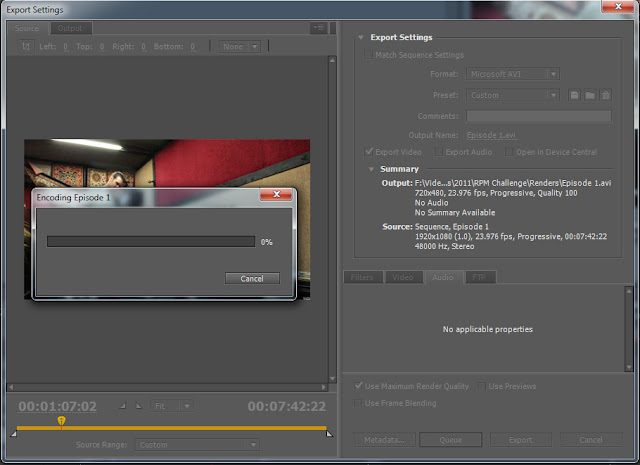
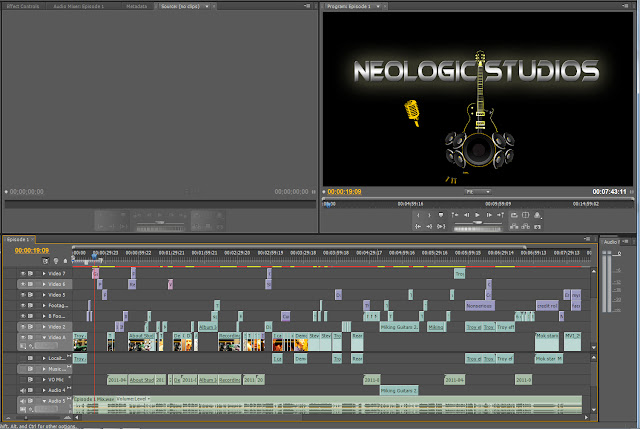
Working with Premier Pro has been fun and easy to learn.  I exported the OMF several times however because the settings I was using to export it didn't like to import in sonar and would give wave data errors on reading.  I found the correct method to export had to deal with encapsulating the audio in the OMF project file and that did the trick!


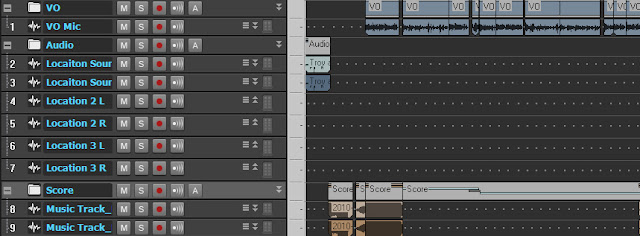
Now, I've been going through the various channels of audio I have to work with.  Because I originally started working to picture inside of Premier, I have a few music tracks I brought in and placed for effect.  On top of that, I have several channels made in stereo and mono to accomodate mixing the various sources.
  • Location sound: Audio recorded in-camera on-location during shooting.
  • VO: All the voice-over material recorded separately, whether to picture or ADR later.
  • Music:  The music tracks brought into premier in stereo.

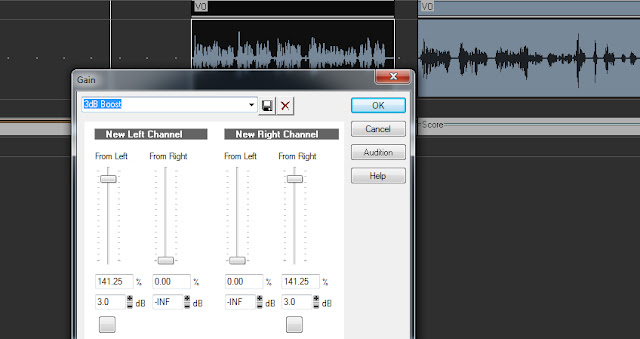
So, after creating some quick buses and routing the appropriate channels, I moved on to scouring through the various clips and correcting volume issues, simply applying a gain adjustment on each clip individually until overall they were within similar ranges.

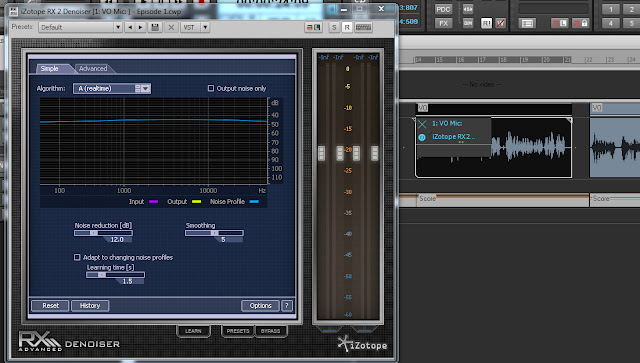
The next step involved noise reduction processing on each clip and going through each and applying denoising.  This took a little bit of work until I got reasonable results and just copy and pasted instances of the plugin across certain clips.

I had audio recorded with an external mic on location for some of the shots, that were in the same lane as the VO work I had done with Myke here at the project tank recently, both with different noise profiles.

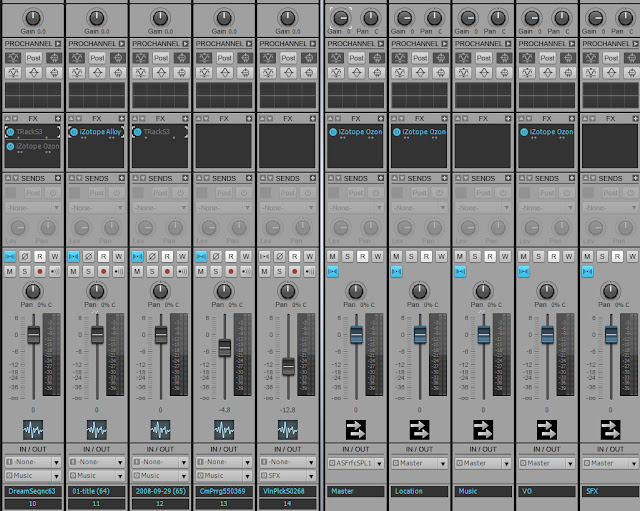
I then bounced these clips individually to commit the plugins to audio and gain back valuable processing resources. 

Finally, on the buses I began to apply various compression and processing tools to get the whole mix to gel.  I wasn't done yet though.  I still want to get the picture imported so I can try to add some spice to the video, sweetener effects and foley to enhance the visuals.

I went on google to research the error window that came up when I try to import any video type, and I ran into this lovely little bit of information on the cakewalk forum .  So I went and checked out the little application they linked to called GSpot  and ran the utility.

It's A handy little tool to help with troubleshooting just this sort of problem!  While the codecs on my system are installed to view the video in applications like windows media player, they are 32-bit only and since Sonar is a 64 bit install, I went back into Premier and rendered out a 2nd video in the .AVI file type.

After about 10 minutes or so I came back to Sonar and the video imported and I got to work on starting the editing and mixing.

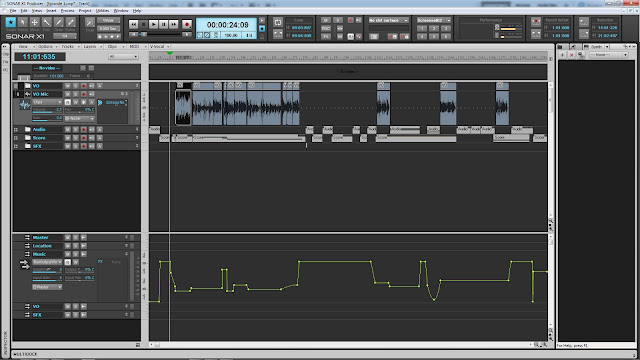
I spent quite a bit of time honing in on getting volumes adjusted between the buses and then automation became the name of the game.  There's a certain system I established later on in the evening for 2-3 different volume levels in the underscore where I felt it appropriate to differentiate between Myke's VO and the on-location voice and audio material.

I made one final pass through the whole project for a critical listening session and final mix-down began.

With the newly rendered master stereo mix in hand, I opened up Premier again and dropped the audio back in.  I wasn't finished yet though as I still needed to do some work on cleaning up the two animation sets in After Effects I had started a while back.

The intro title shot needed a finish to the animation, so I opened it up and ran into the snag that since the update to CS5.5 it had to recreate the file to appropriate the new version of AE.

Keeping Premier still open I was able to hone in on the timing I needed to get the animation just right, however quick it was.  I still feel if I had more time and were willing to try and do more with the title shot I'd take it a whole mile further and make it just pop out, but it's time to just finish up!

I committed the final changes, saved the AE project out, deleted the old link in Premier and dropped the new version in, and re-aligned it.  Next was the 'Kinetic Typography' animation shot.

There was a few sweetener sounds I wish I could have found to go in some of the dead spots but I'll just have to remember my ideas for the next episode.  With the final touches finished I rendered out the video and headed for Youtube.


Viola, here it is for your enjoyment!


Wednesday, July 13, 2011

Ukelele aloha's...

Just spent the other evening with Troy doing a quick improv instrumental for Ukelele!

Wash My Filthy Hands by Neologic Studios

On top of that, I'm feeling quite productive today despite some personal aggravations...
I'm attempting to reload the first episode of our supposed video blog for final editing.  I have decided I want to develop a workflow for audio and since I plan on using Sonar, I'm trying to find the best way possible to export things for working to picture.  Perhaps I'll go in depth when i get a free moment.  Back to work on this orchestral mixing for a client!

Monday, June 27, 2011

The fiddler in my room!


Today will mark the end of a rather sudden, and quick project.  Troy and I got a call from a friend on Thursday about a recording job someone needed in a hurry; he wasn't kidding.  This client wanted a full album done over the weekend to have duplicated and ready to sell by the very next weekend for his tour across the U.S.

I know what you're probably thinking: that's a tall order, all the instruments, all the time needed to get sound dialed in...  Except, this client is not your normal modern musician.  Once we cleared up the client's request and our prices, we discovered he's a fiddler and his album is a solo project of his that he wants to be able to have a short run duplication on hand to sell at his events.

Troy and I discussed what we would want to do for the weekend about the project and opted to use my place instead to record proper acoustics.  Saturday morning we got up super early and headed to the studio to pack everything up and haul it over here.

After getting EVERYTHING set back up, we strolled right into mic placement and auditioning mics.  We started with 3 we really wanted to hear for the close mic.  However, Troy had arlready pre-determined (as had I) that the NT-K was probably going to outshine all the others, and we got started on a few other choices for capturing the natural sound.

I was lucky enough to get the room as quiet as we got it.  Aside from some minor inconveniences like an attic fan adding to the hum in the background raising the ambient noise floor to audible levels, the session started out in the middle of a terrible hour for traffic down my street it seems.  A couple of passing automobiles made its way into the tracks.  However, we made it through most without much a due about some sonic interruption.

The client wanted to record as many as 25 songs.  Most of the arrangements were on the Fiddle, while one or two would be on the Hardanger Fiddle, and about 5 or so more on the Nyckelharpa.  All the compositions originate from Sweden, and more are classical folk in nature than anything else.  Luckily, the client was well rehearsed with all that material so that in just a few hours we had completed all the songs.  Normally a major time constraint as such would be an impossible request to fill!
After we completed the recording, I discussed some options for duplication services which would allow us the rest of the day to get things in order while he got stuff together for his for album artwork.  He came back today to finish the artwork layout after choosing a duplication service based in San Francisco.  Close, extremely affordable, and short turnaround time!

After yesterday's session Troy and I took a break and did some running around, playing Super Smash Brothers Brawl on Wii, and then he left while I returned to editing and mixing the tracks.  I started with just roughly mixing the mics to see if I could get a good blend going on.  I found two distinctly different sounds with the options we captured.
  1. The classical sound: very ambient classical, retaind all the dynamics in good clarity and the sound was very soft and somewhat distant with the room mics bring the only two sources, panned hard left and hard right.
  2. A more modern, intimate sound: The modern day studio sonics we achieved with the mic we chose up front and center, pairing it with just the right choice of mic pre, and a discreet amount of compression in the mic pre during recording for needed sustain and color. 
This close mic brought out a ton of brightness in the instrument that isn't naturally occuring to our ears when hearing the instrument performed right in front of you.  The modern intimate sound with the center mic providing the main sonics for the mix, supported by the two room mics lowered in volume substantially with both feeding discreet left and right signals into a stereo verb Aux bus.

I resumed the project today and since this morning i've been editing beginning and ends, tails, fades, playing with denoise plugins and final master bus effects to dial in just the right sound.

As of now I'm getting two album sequences stemmed out for the client: one with all the tracks for his private copy and one sequenced in his specific order for duplication. Next, I will be headed into Sound Forge to do the final denoise stage to get rid of some particular unwanted background elements that had crept in on a couple of tracks. 

Dealing with denoise plugins can be risky business, because you affect everything. I found it surprisingly easy with the de-noise processor I'm using on the master bus to deal with the attic fan in the background.  I actually used this knowledge to my advantage and thanks to the sonic content of the fiddle and Nyckelharpa, the "air" in the mix was sufficient enough that when I applied the noise reduction processing it took it out just enough to soften the harsh hissing established by the close mic capturing the natural phenomena of a bow dragging across strings, thus allowing the melodic content to come through with warmth, and not be too bright.

It still didn't deal with the random artifacts I had found after hours of scouring through the material for them.  A few car rumbles and even a Harley Davidson had crept into the mix ever so slightly.  I would need to use a spectral repair tool to try and deal with removing these particular nasty artifacts, and this is where careful attention to detail is needed most because any changes made to the material can make it suffer just by trying to extract the unwanted material.

My first attempt at spectral repair was actually pretty easy and I pulled some clips for before and after comparisons.
  1 - before by cameron-bashaw
After some quick tweaking, and I mean quick; I was able to get fantastic results.  Just a little know-how and understanding of spectral repair can go a long way.  It's like Photoshop for audio!
  1 - after by cameron-bashaw
Another one I had a bit more trouble with as the fundamental in the bass frequencies was easy to find, but I couldn't find and isolate the upper octaves from the musical content without damaging it.
  2 - before by cameron-bashaw
This one took a bit of work, I found most of the low-frequency offending content and was able to eliminate it from the material, but the upper range in the offending noise I just couldn't find.  I know the tools are pretty in depth and with more time I could probably hone in on it and completely eliminate it without sacrificing any audible quality to the musical content.  I just ran out of time for this project.
  2 - after by cameron-bashaw

Having just finished the final master to hand to the client tomorrow, we got an awful lot done in two days!  Recording 23 tracks, editing, mixing and mastering, sequencing, album artwork design; the whole thing was a blast and we both enjoyed it!  We're hoping another uncommon act comes our way!

Sunday, June 19, 2011

Dizzy is as Dizzy does!

A lack of updates concerned me just now so I thought i'd share why.  I've been busy with life's obligations - desperately job-hunting; consolidating things and organizing things to sell off.  I'm also in the throws of wiping my computer.  I just finished reinstalling windows and am in the process of reinstalling EVERYTHING.   I even had to make a list a few pages long of all the things I needed to redo once windows was back up and running fresh. 

Mostly a due about audio: the plethora of virtual gear and several of my favorite daws, plus various other things making their way back on here could take a couple of days.  I've also had the urge to get back into painting practice with the tablet, as well as start working on demo reel stuff.  So much to do so little time. 

Expect to see posts soon about the video blog's first episode!  I may finally get it done, and the post will be up on the studio's youtube channel.  I believe Troy wants me to resurrect and finish another video project we did for shits and giggles. I'll warn everyone now it's extremely cheesey, even for cheese.  That post may come up soon as well.

After the maelstrom of random life events i've had to deal with the last couple of weeks - friends happenings, jury duty summons, family obligations, financial re-orientation; i'm just barely getting back to business and get back into the swing of things.  I can't wait for the film project coming up end of july!  More news on that soon.

As for now, I shall leave you all with a quick photo-manip I did of Troy.  Photography done by the amazing Michael Fowler! Thanks bud!

Thursday, February 17, 2011

RPM Challenge Day 12

The big day arrives to track at the studio, we have the whole day to ourselves, and the whole day is reserved just for tracking the Indie song Troy finished writing earlier in the week.  We arrived at the studio early enough to get a good start on the day's progress.

Going in we could tell something was looming overhead, we'd made a lot of progress without any real issues, as if we were having too much good luck on our progress thus far.  We quickly tracked the electric guitars to the demo track we had done earlier. 
Troy took a few runs through tracking and we experimented with the ideas for the sound we wanted to achieve.  Double tracking with two different guitars and pushing different sounds through and playing with panning ideas for editing and mixing later were critical notes we established early on in the day to stay consistent with the "vision". 
After guitars we moved to drums.  While we discussed what setup we wanted, I mentioned I've been wanting to experiment with a unique mic selection for overheads in mid/side for this track that might sound really cool. 
We went out to set up our mics and get the drums together.  I started setting up overheads and Troy brought out the rest.
In addition to the overhead selection we tried out a wide setup for room mics, and 3 mics on the kick to go for a really fat and thumpy sound.
 
We got all the mics set up and were underway until the point where we had to get levels and settings dialed into the preamps.  The first sign of trouble was that our overheads weren't getting any signal at first.
Our very first problem started manifesting with our patching as we'd been moving a lot of stuff around in the patch bays trying to get the order of things we wanted.  The next issue that came up was running clean enough power to the tube condenser mic I wanted to use on the overheads.

Due to our unique location's design we had to run a large extension cable into the drum booth to get power to the power amp for the microphone.  Even with the extension plugged into power conditioners it still caused too much noise in the line to use. 
 
We dropped the mid/side idea and ended up with just a single overhead mic, and it sounded beautiful all on it's own!  The room mics ended up playing more of a role in the mix.

Then something more serious came up.  Our whole morning seemed shot as we had to deal with the issue of one of our mic pre's misbehaving.  While Troy's had this particular preamp for almost a year we have never really had to use it until now, and that's where the trouble began.

Troy called one of our friends at our local Guitar Center where he bought the preamp from, and tried to see what we could do on it, while we tested it out. We even took it out of the patch bay and tried running direct. 

After a 25 minute call we ended up closing up shop for a side trip to Guitar Center, with the broken down pre
After a bit of waiting around and discussing options on what could be done, we got rid of the defunct mic preamp and walked out with a lovely new one from Universal Audio.  Troy says he's been wanting this one for years, and now he has it. 
We got back to the studio quick and plugged and patched in the new preamp to get back to tracking.
With the new preamp up and running and everything set up and ready to track we resumed the drum track.  Troy went on a few takes for the drums being as they were a simple enough beat to keep in time with and not a whole lot of fill work for the style. 

We tracked through the drums with a few hiccups in recording.  We still ended up with a great take and amazing sounding drums even unmixed.  Up next to finish off the track: Bass.

Troy decided to go back and clean up some of the guitars so we dialed in a sound on the amp and the preamp to sound warm and toasty! 
With so much stress from losing time and taking care of random issues throughout the day, we stopped production and decided to resume tomorrow.

Monday, February 14, 2011

RPM Challenge day 11

Today marks the last weekday to get stuff demoed.  This week was marked with lots and lots of phone calls about potential jobs with friends and colleagues lining up for future dates, which is great and distracting at the same time!  Business is business however, and today we wrapped up Curing the Cure's final vocal takes.  This song is finally tracked.
Steven (left) and I (right) getting a good look
We had a lot of fun fooling around between and even during tracking the vocals!  Troy danced, Steven cracked jokes a lot of laughter kept the night moving quickly.
Troy getting his groove on
First things first, Setting up the mics and pulling up the track and reviewing what was needed on the final takes.  Steven was ready to go right away.
After just a couple takes of the main track we had a take we liked and reviewed the sound for the "corrupted" vocal overdubs.  I used plugins on the vocal track to test out a deeper voice manipulation effect that erred on creepy phone call status.
Troy getting a kick out of the voice manipulation effect
We goofed around for a bit while I dialed in a good setting on the effect, and got back to work on tracking the overdubs.
Just a few takes later we played more with the voice manipulation effect and reviewed the progress on the track so I could make mental notes on where to take it in editing and arrangement.  Since most of the song is done virtually aside from the industrial noises I sampled from found objects which were then processed, I'll go back over the track and start adding in various other elements to make the song sound fuller.
Discussing the final takes
After that, we took a break to go eat and Troy went to pick out some music from a retail store as research for another song we still have to write: the electronica song.
Steven's last look
We are still unsure of what we want to do for this one so afterward we wanted to go to the studio to get inspired.  However, with time constraints we ended up coming back to my place and just listening to bands like Celldweller to get inspired by the fusion of metal / techno / and industrial.
Troy at it again, dancing to Celldweller!
We really couldn't come up with ideas quickly enough, and he had to go for the night.  We discussed the songs we had left to do, and I decided to tackle the Fight song later in the evening.

The metal gods are not pleased...
I quickly got set up to record guitars and start demoing the Fight song.  Finding a good sound was hard because I didn't quite have any ideas solid in my head,  I played around for a bit to find the sound I liked and Troy commented it sounded very Metallica-inspired.  Thanks!
Schecter Hellraiser C-7 goodness
After a few ideas trolling through my fingers and out my amp, a few setting changes, and a good while, Troy finally decided to leave for the night, and I got on with tracking what I had.
I tracked the guitars and laid down a quick beat and then even laid down bass.  Most of the song was demoed, it still needs some more arrangement work but the core of the idea is there finally!
Tomorrow we are going to be super busy in the studio tracking all that we can!  Stay tuned for more!