Sunday, January 22, 2012

Rollin!

As I'm writing this, we've published and submitted the ACE spec commercial to CBS.  There was a lot to get done and all the people that contributed made a huge impact on it!


Nick contacted me a couple of weeks ago about doing a commercial shoot for ACE train as part of a contest with CBS.  If you missed the info on the pre-production, check out my previous blog entry: Aces & Trains!  Meanwhile I've been busy with the McClure Sessions collaborating with Troy, and recording a couple other local artists.

Anticipation was growing  as we headed toward production day. Troy and I have been in editing phase of post-production the last couple of weeks as we wrapped the recording phase up for the McClure  Sessions.

Production started at 5 am for Nick, Yuki, Drew, and myself in Stockton to get some footage of the Train coming up to and leaving the station. Nick Yuki and Drew all came up from LA literally the night before the shoot, which meant operating on little to no sleep.  Crazy guys.
We then had to wait for our train to arrive, and dashed to hop on board as quickly as we could with our gear, and meet up with the extras and crew in Lathrop.
It was a quick rush to help get all the extra equipment in along with all the extras and situated in the car to prep for shooting.
 
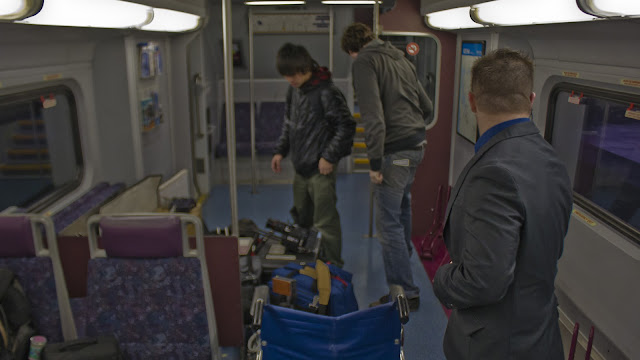
The first part of the train ride I sat down below with all the gear on watch and awaiting data management duties, while Nick and Yuki and the crew began setting up to start shooting with the Red Scarlet-X.  
I ran BTS and 2nd camera (not needed) with a T2i thanks to Troy.
Once I got to switch duties with some of the extras to allow me to come up and roll some BTS and help with lighting and camera assist for Yuki, Drew kept me in line on what to do.
Each shot featured either an extra or the train in a way, as Nick called them "Hero" shots.  To convey the purpose of the commercial.   

Yuki has a very good eye and Nick is very clear about the particular shots he wants.  During Pre-production we went over his initial storyboard which was a series of photos he had found that conveyed the message he wanted.  He then updated the storyboard for production with some of the shots I had taken during pre-production scouting the train the week before.
 
 
Yuki executed the cinematography perfectly, and Drew being first camera assistant and lighting was a very big help as i picked up the learning curve.  Once we arrived at the station we had from late morning until noon to get a couple more station shots and scenic shots before we had a lunch break.
While I can't exactly go into detail on the process of how Yuki worked pitcure in-camera, the raw playback was pretty amazing on its own.  I don't believe he even used the HDRx capabilities of the camera. 
 Break went fairly slow as it was a lot of waiting around but still fun none-the-less!  We resumed after lunch break to get a couple more shots both inside and then outside the train station before our train arrived to take us en route to our home desitations of Lathrop and Stockton.

There were several more shots we tried to get on the ride back home, including the relaxing book shot, and the bike rack below.   Sunlight was starting to fade quickly by the end, and we also had to consolidate and unload at the Lathrop station so that the crew that started there could depart there without missing a beat.  Nick, Yuki, Drew, and I ended at the stockton station packed and ready to head back to his place to shoot the final shot which is a visual effects shot to add into the ipad scene.

After that wrapped, we had dinner, and I left them about 7:30 pm to come set up my recording gear and prep for the V.O. session.


We wrapped recording at about 9:30 pm (roughly), and I proceeded to start treatment, de-noising and editing, and some minor pre-processing to get levels decent to send each take to a dropbox folder to house our miscellaneous project content we set up to collaborate via the internet.

Then, on Friday I took the time away from editing the McClure Sessions to compose a short cue for it, and sent it off to the dropbox for Nick to drop to picture.  While they finished rough and fine cut, I waited to receive the VO track back to start mixing the audio together.  And finally, a day before the commercial is due, Nick was in final VFX and coloring as I talked with Nick online getting final mix edits done for broadcast master.

As I sit here and write, I just received word from Nick that the submission was successfully received, just in time! 

Friday, January 13, 2012

Aces and Trains!

Wow, where to begin...  The last couple weeks concluded the production phase of the McClure sessions:  an upcoming EP project Troy and I are just now starting post production on.
Just finished drum setup
Chris Gettin' down on some drum-tracking.
Drums, drums, drums.
I captured as much as I could of the sessions and plan on building a new video update for our studio channel by the time the mixes are done so keep an eye out for a brand-spankin' new video soon!
Left: Chris McClure, Center: Troy Reed
During these past couple weeks I've also had to wipe my main workstation clean and reinstall windows Fresh, as I just acquired Pro Tools to add to my studio DAW list.
Pro Tools 9+10, so awesome!  and yes, my shirt does say "Talk nerdy to me"
I have QUITE a bit of stuff to reinstall and I'm just barely finishing up all that, but while I have I managed to restring both my guitars, major issues with my BC Rich as usual (I highly dislike Floyd Rose Tremolo bridges).  If that isn't enough, this week alone has been very busy as I help Nick with pre-production for a commercial shoot this coming Monday and Tuesday for ACE train!

On Wednesday we arrived at the Ace station in Lathrop at about 6:30 am to shoot some pre-viz shots and plan out everything for the production.


It was a super tight schedule to figure out how to shoot arrival and departure shots, so we hurried onboard.  The rest of the day was the "hurry up and wait" as it usually is for production trying to get the timing just right for shots and then waiting patiently in between.


Thanks to Troy's T2i I was able to get plenty of test footage as well as these wonderful stills.  These just underwent some SUPER quick post correction for visual reference.

I'm hoping these are good enough to help Nick establish some groundwork for his D.P. Yuki to have a solid, all-encompassing reference for production.  All in all there's easily 2 gigs of photos and over 12 gigs of temp footage.  I believe on production days Yuki will be shooting with a Red Scarlett and I'll be helping with data management as best I can.  I'll try to keep posting more frequently as the days get busier!

As always, I enjoy any and all feedback!  Please feel free to leave comments of your thoughts on the subjects, opinions, suggestions, even flaming rants!

Thursday, December 22, 2011

Secret, but fun!

Several projects I can't really talk about in too much depth, but rest assured there's going to be plenty to talk about soon!  The last week have been pretty busy as I've been working with Ian and Ricardo and Nick shooting promotional material for an upcoming feature film with their production company BackYard Studios.  Check out this short video to find out what the project is all about!


It's been busy. I spent several days working with Ian, Nick, and Ricardo and I'm really excited to see this project get started!  I'll be sharing little bits and pieces of what I can on here as the project rolls along.  So keep an eye out!

Aside from working with Backyard Studios, we have a few studio projects we're working on.  Today (Christmas day), we're actually going to be moving all the studio gear to the Project Tank because on Monday we're going to be tracking a special project at my house!  My latest piece just arrived in time to aid with our recording too, a Radial JD7 Injector.  This week's project is going to be chock full of more win than Charlie Sheen himself!


Even though it's Christmas, we've been busy working.  Troy and I literally just spent 2 hours moving all the studio equipment to my place which I am just now hooking up and setting up to prep for tomorrow morning's session!  Then, i'll be on my way over to Mok's house for a Lan party with a bunch of friends for a bit.  Finally, I'll be back home in time to do stretches!  Boy what a day it's been on Christmas day!  I've also managed to complete the first 3 chapters of my story and am now on the 4th...

However, it is better to give than to receive, so here's a special treat I hope everyone enjoys it! (It's all in good fun, no egos were bruised during the making of this piece).  Click for full view:


Have a merry Christmas everyone!  Feel free to leave comments!

Tuesday, December 13, 2011

Fresh off the virtual press!

I finished all the marketing material for Trials And Memories who wanted some posters and business cards and such for promotions.  Don't forget to check them out and hear the orchestration I did for them as well!

The Album is avialable online now @ Reverbnation and Bandcamp

Click on the caption below to go to full view page on my Deviantart Account:

Poster 1
Poster 2
They asked for 2 different posters for the local stores and for venue and promotional, as well as a band bio which is just the last picture with text below it.  The album design I did is below, check the full view page on my Deviant art account by clicking on the caption:

Outside tray-card
Inside tray-card
Booklet Cover
Booklet inside
Disc print

I'm finishing up my Fractal gallery updates, here's a few of the new ones I've been working on:
Phase-Phobic
Cepstrum
Anechoic
RT60 2.0
Dipole
Hysteresis
The First Wavefront
Nyquist Theorem
I will be creating a separate page here on my blog that has links to the full downloads on my Deviantart account.  I'm also considering offering a wallpaper download pack for the various sizes which will include 2560x1600.  As always, let me know your thoughts;  any feedback is appreciated!

Sunday, December 4, 2011

Update this!

If you haven't noticed (or if this is your first time visiting) I've redesigned the layout!  Let me know how you like it.  I do have quite a few things to share however: first being I've just uploaded the entire RPM Challenge Album for everyone to download - FREE!

Borderline Soundtrack (16 songs in 192kbps mp3, album art, and readme.txt) - 128 mb zip file

I've got some new fractals I'm working on to add to the Aural Ascendancy series gallery I have.  Those will be going up soon.  I've also been busy drawing up more of my short skit storyboard and working on building the 2nd episode to the RPM Challenge we did back in February.  If you missed the first one:


The last week has been kind of crazy prepping for a last minute shoot in LA that didn't go through but there's still a project to come of that (supposedly).  Harry wanted my help in putting together a plan of attack for doing a timelapse for a corporate video project or just plain to have for whatever the company wants it for.  I did some research just to make sure I was up-to-date on all the options and narrowed it down to 2 options: 1-2 DSLR's with kit lenses; or a few GoPro Hero HD cameras.  I had very little information on the project to go by other than it's for a 3 week construction project.

He asked me to come up with a solution to tackle the time-lapse, and to get ready to go down to LA with Michael Mok on Thursday (just three days later) stay the night a motel and be up early enough to head out to the campus grounds where they are to start construction Friday morning.  Mok and I would set up the time-lapse system and then proceed to get some interview and B-roll footage; wrap up and head back home that same day.

So, I roughly dove into the world of time-lapses and cameras.  My first solution was to keep a budget in mind (which I had no point of reference whatsoever).  My first thought was to check out GoPro as Mok and I had used them on our previous venture for the Reality Series pilot we were shooting for a previously discussed producer (see A Dashboard Confession).

We all know what a time-lapse is so I'll skip the descriptive analysis.  What it comes down to is that The GoPros offer a very affordable solution that's also easy to setup, but somewhat limited on time-lapse management.  The whole situation calls for us to set it up and leave it, and GoPros only run with an SD card.  I ran into these factors that I immediately emailed GoPro about as I was emailing the pitch to Harry:
  • Can I charge and operate them at the same time?
  • What's the longest amount of time I can leave them unattended?
  • How can I manage the media?
The GoPro support team is amazing! Not only were they quick to respond but they took the time and went the extra mile crunching numbers and giving me some great reference points by telling me exactly how many frames at 5-megapixels I would be able to get on a 32gb SD card, and due to the fact that the cameras shoot at 60 second intervals max, a frame every minute if the camera were to shoot around the clock would last only 1 week.

So here was my pitch to Harry as I was contacting GoPro:

Option 1: 
  •   - Retails $200
  The interesting part is that it's a 5 megapixel camera which is more than double the resolution for HDTV 1080p which gives plenty of room for crop and pan movements to spice up the timelapse.  The downside is I'm not sure what the maximum length of time we'd be able to leave them up to capture until I get a response back from GoPro about several questions I asked them.  This solution however would be an affordable way to get multiple cameras up for multiple angles.

Some accessories to consider:
  •  - Retails $50
  • USB AC Charger
  •  - Retails $20
  As i can't find any documentation and am currently contacting GoPro about seeing whether you can charge and use the camera at the same time; this may be a necessary item for each Camera.  The SD Card price is based on their website though i'm sure we can find cheaper elsewhere.   When i contacted GoPro I submitted a question involving whether or not the cameras can be tethered to a computer for storage and capture which would bypass the need for SD cards, I'll let you know the results as soon as I get a response from them.


Option 2:
  12 megapixel camera, kit includes 18-55mm lens which for covering the viewing angle of the landscape we'd want to cover should be more than good enough, Canon lenses are also good quality optics too though we'd have to play a bit with settings before starting timelapse.  The cameras ARE definitely able to hook up to a computer to control the time interval and store the photos away from the camera.  This however does require quite a bit more setup, programming the camera for the best picture mode I can handle well enough but these cameras are quite a bit larger than the GoPro's and will stand out wherever these are put up on campus.  The advantage of having a camera like this is we can greatly control the capture interval for more effective file management.  If we know exactly how long we want the timelapse to be compressed (3 weeks to 2 minutes for example, we can set the interval accordingly with the accessories).

Some Accessories to consider:
  • Camera Armor
    • Retails anywhere from $15 - $50
    • Absolutely necessary for outdoors and on top of this I'd suggest black trash bags to wrap around and cover the camera and only expose the lens (use lens hoods too).  Covering with trash bags should help hide the cameras but I wouldn't rely on it as a theft deterrent.
  • Battery Grip
    • Retails $50 - $80
  • Extra Batteries for Grip
    • Retails $49.99
  • Lens Filters - UV, and possibly others.
  • 32gb SD card or larger
  • OR laptop or computer source to hook up and control remotely for storage and transfer.

  With the DSLR's we'd have to figure out a mounting option for getting the perspectives we might want, I would expect we'd want more bird's eye views or high vantage points as well as something eye level if necessary.  It really depends on the location.  If you have the address perhaps we can look it up on google maps and get an idea of the space we're working with.

  There's advantages to getting either option.  There are other camera systems like PTZ (Pan-Tilt-Zoom) setups where we can completely remotely control them but are VERY costly ($10,000+ when you consider the broadcast and controller equipment just for a single camera).  I think either of these options should be feasible, just depends on what you want to budget.  The GoPros are the most affordable so we COULD get a decent array going for several points of view to cut to and from.  The downside is if we can only capture onboard the maximum interval length is a picture every minute.  Therefore we have (speculatively) very little control over our time-lapse management.    Option 2 with the DSLR's is quite a bit more expensive which may limit our number of POV shots we can get, but may yield MUCH more control over timelapse management and greater quality image capture due to higher resolution.  Another option that the DSLR's give an advantage over is shooting in Canon RAW (much larger file size) to allow for even more vivid image control in post (better contrast and brightness control in case of severe weather and lighting conditions).  The DSLR's however are still considered entry level and are limited on other formats and features like recording HD video (720p max) compared to other higher end models that can better suit other productions later on.  Image quality-wise the picture would be even greater and higher fidelity than the Sony Z1u you currently use now, but due to the resolution restrictions this wouldn't be an ideal camera for productions so flexibility as a production asset would be minimal and very specific.  The GoPros come with all-weather housing and can even go underwater, which make them extremely versatile and affordable.  These can easily come in handy for productions later on if necessary.  Not to mention the accessories like the Wifi bacpac for remotely viewing and controlling the GoPro cameras (this will be available February next year) will make them even more controllable than they are now.
  Let me know if you need further information on anything or have questions about any of this.  This is just a rough outline.  I could also look up some consumer HD Video cameras as alternatives but usually sensor quality is poor compared to the DSLR's or GoPros and often don't have Timelapse mode support (only 1 or 2 canon and Sony models i can think of actually have specific Timelapse modes featured on their camcorders).
Timelapse Considerations:
Shooting with GoPros would yield a high frame-count which would require cutting out a lot of unnecessary footage (cannot start and stop them).  They also do not (yet) tether.  However, due to their size and even without the waterproof case they are extremely durable and make it very easy to set them up and let them shoot just about anywhere.

With DSLR's it's the opposite:  They are larger, heavier cameras that need good support or some type of fastening system to keep them in place to make sure they don't move.  They have the capability of shooting larger resolutions (you don't have to shoot at the maximum resolution), AND can even give an advantage by shooting in raw.  However, file sizes go up exponentially by shooting in Raw which is another constraint if you're operating off of memory cards.  The other advantage with them is that they can be tethered to a computer to manage file storage and time-lapse management.  This would allow us to be more efficient in controlling when the camera will shoot and what interval to capture frames in so that we get the time-lapse just right without excessive data to have to manage later on.  The issue with tethering is the software running on the computer only manages 1 camera (as far as I've seen).  If you want multiple DSLR setup you're going to need multiple computers to remotely manage them, which also needs to be in a secure location and protected from weather; not to mention having to acquire a computer to attach to the camera is an expense in and of itself.

These cameras are pretty easy to spot, and are also susceptible to cold temperatures or weather conditions so accessories like UV filters, anti-fog or moisture applications to put on said filters, and plastric trash bags to cover the camera and leave only the lens exposed are all good considerations not only for protecting the camera but also to help deter from possible theft or vandalism.

As with both solutions. they can run on AC power and operate simultaneously, but usually when you're doing timelapses its often in places that are a challenge to get AC power to.  The final factor one may have to bring into consideration is a battery backup / generator solution that can maintain the setup in the event there is no AC power available on-location.

What are your thoughts or experiences on shooting timelapses?  What was your solutions for complex scheduling or longer-length projects?  I'd love to hear your comments and feedback!

Wednesday, November 30, 2011

New Fractal Gallery: The Aural Ascendancy Series

A while back (Late 2009) I Had been playing around with a new idea for creating fractals that visualized audio phenomena and terminology or simply inspired by music.  Thought I'd share; it's been a while now since i've posted any of my personal art work on here.  These will be going up on my DA account soon.  I do plan on doing more shortly as well.

Phase-Phobic
Pulse Rider
RT60
Red (inspired by Motorgrater - Red)

Tuesday, November 29, 2011

We get some Soul..

This last weekend Troy & I went to Milpitas to film a live performance of Pacific Soul as a favor to a friend of a friend.  Wow!  This group is a nine-piece band that performs R&B classics and are a really well-rounded, amazing sounding group!  Pretty much everyone in the band sings and harmonizes together, Everyone's got a function in the band that plays well.

It was sort of last minute and a little under-communicated, but I think we've pulled it off with a decent look.  We shot with the Sony Z1u and the Canon T2i so the look between cameras is vastly different, and is a real pain to get a close match between them.  The area they were performing at was inside at a seafood marketplace, and was really dark (no lighting).


The Canon T2i fared well as we simply boosted the ISO to 3200 and the footage came out clean even at high ISO for video.  The Shutter speed pretty much sat at 60 and Troy walked around with the T2i getting various close-ups and shots with the shoulder rig we were lucky enough to have borrowed from a friend's production company!  Thanks Ian, we'll have it back to you ASAP.


I kept the Z1u stationary and just did simple panning and zooming as best I could while taking notes and monitoring audio.  I brought my XLR cables for just such an opportunity to get a direct feed from the Front-of-house (FOH) mixer. This was where I ran into a problem.  Once I started monitoring the audio coming into the camera with my headphones I noticed severe compression and limiting and I had already set the camera's gain settings for the XLR inputs to -18dB (the furthest down it would go).  I thought maybe it was the camera doing the limiting and maybe just maybe it would be decent.
Pulled frame from T2i footage
The next level to the audio problem was the mix itself.  The FOH mixer was only creating a mix for the PA system to pump out to the audience.  I know how live mixing goes and for a session of this size the PA really just needs to fill in the gaps for the lowest level performers: Keyboardist who has no amp on-stage but has a monitoring speaker by him, the vocalists who also have a couple of monitoring speakers in front of them on the ground.  The Bassist has a cab on stage but it's mic'd and instead he's also using a monitoring speaker on the floor.  There is a percussionist in the back, and to add to that an electric acoustic guitar being played by one of the singers as well who's got a direct out feeding the mixer.  The drummer has some mics on the kit but I couldn't see much as he was behind the stage. 
Pulled frame from T2i footage
The problem with getting a mix from the FOH is the mix is designed to fill in the mix around the drums which are naturally loud.  The keys had a prominent position at teh front of the mix, the vocals collectively sat just behind that, and the drums were barely audible in the mix at all feeding the PA system.  the Bass sat just under the Vocals as well and was primarily low-end.  However, the mix was either being heavily compressed in the mixer or as an artifact of the signal coming into the camera.

Pulled frame from T2i footage
We had no idea how it would turn out in post, but would have to make due with what we got.  Before the performance started we had time to set up and talk to the engineer at the FOH mixer.  I did notice he had a macbook with Pro Tools ready to rock and the idea was that he was to capture the multitrack performance from the mixer so that the whole session could be mixed properly in post later on.  After the performance was over we talked to the engineer again and that was when we were informed there was no capture into Pro Tools!  Sometimes these things happen and miscommunication can lead to issues that need troubleshooting later on.

Pulled frame from Z1u footage
So I'm at home dubbing the tape from the Z1u into Premier Pro and then importing all the captured video from the T2i.  Once we started dropping the video on the timeline I got really curious as to the sound of the audio from the T2i.  I was greatly surprised by how well it could fill in the mix once i started getting everything in line.  I knew I'd have to battle with sync issues as there was no way to lock the two cameras together so that frames and timing would be in sync.

Pulled frame from Z1u footage
You won't notice it by the video as the lip-sync between both cameras is not noticeably off, but where you will immediately hear it is in the audio tracks lining up.  It creates a slight delay affect that's a quick echo.  So, this can be simply remedied by bringing the audio into Sonar later on and aligning them so they are in-phase.  The natural top-end clarity due to the small diaphragm of the built-in mic in the T2i was able to lend clarity to the mix from the Z1u which was quite muddy, and the lost transients and the natural room tone (the live sound) came back making the drums present again.

Pulled frame from T2i footage
My final issue to tackle is creating a good blend between the two audio sources in mixing to get the sound to blend.  There is a couple spots where the main audio track (FOH mix) cuts out.  First in the very beginning something happens to the mix cutting out.

The timeline cursor (red bar) you can see the right channel cut out and then the left channel.

Then I had Troy run the T2i while I changed tapes because I was running off a previously used tape that still had 30 or so minutes unused.  Finally got the fresh tape in and it took a little bit to get to camera speed.

The timeline cursor is where you can see the gap in the main video and audio feed.
Other mix conditions have to do with Troy's camera position around the band and how it captured the sound of whichever instrument or vocalist is most present.  Some positions he took with the camera are directly out of phase with the direct mix as he's standing next to a speaker 180 degrees out of phase with it.

Just barely wrapping up final edit.  It's getting even more hectic as there are a couple jobs coming up, and i've been getting contacted about more job opportunities elsewhere..  The immediate agenda for now is to just finish this video and get back to my story-board and novel projects.