Showing posts with label behind the scenes. Show all posts

Wednesday, August 29, 2012

How to The make The Cut


Building several commercial spots on the fly was a blast, and a challenge.  I had gotten a call from Harry just a couple days prior to the shoot day which was May 1st.  The idea was to go out to San Jose on short notice, and Harry already had the idea complete in his head so there would be no actual script or storyboard or shot list.

On May 1st, I got up super early to pick up a make-up artist acquaintance I had met through a mutual friend that does photography.  I was all the way out in Escalon (the opposite direction I needed to go) picking up Ava Nightingale who was to be our makeup artist for the day, then zoomed out to San Jose to meet at the Moda Italia store by 10 AM.  When we arrived there was no one even there which gave me and the makeup artist time to go to the nearest store and pick up some makeup supplies she needed.

When we got back Harry and Daren had just arrived and Daren was already dressed in a ninja costume.  Harry wanted to get rolling on shooting and thus Daren and I shot all the establishing ninja scenes where they pop from all corners of the store and converge on Cary and Harry sitting in the back room.

As we wrapped up those shots The other two extras arrived to begin dressing up as Ninjas and prep for the group shot..
Harry's favorite production method to keep time down and crew size minimal is shooting MOS.  So after getting all the takes of the ninjas approaching before they were to strip down for the next group shot of them having their clothes cut off, I took some time to get foley sounds of the footsteps and weapons.
Cary Tagawa arrived as we were setting up for these shots and proceeded to get him dressed and makeup.
Ava Nightingale working with Cary Tagawa.
Once Cary was dressed, I started getting feedback from Harry about the next shot while Melissa Andarmani (who works for Moda Italia) helped the ninjas get suited up for the next shot.
Harry had all the ideas in place for his "story" which is the ninjas coming out from all corners of the store and converging on Cary and Harry who are sitting in the back enjoying some quiet time.  He would tell me roughly what he wanted to see and I would get the camera position and dialed in.  On such a quick time-table, these shots were all done with a single T2i on a tripod, with no assist.  I have multiple SD cards and with the down-time between shots long enough to allow the camera to rest I kept swapping out cards to transfer to a laptop I brought with me.

During some of the down time I used to review shots, and I quickly noted that we had prepped a box of "clothing confetti" but never used in the shot for both the Ninjas and for Cary's slicing and dicing shot.  We ended up having to re-shoot both of those while we had our actors and extras on-set and in their clothing still.  Had I not reviewed the footage I would never have gotten those shots to help sell the effect of their clothes getting chopped off.
The other thing I've been aware of for some time now is that Troy's camera always produces a faulty pixel in the video image.  I've been unable to track down whether or not this was an issue up until my most recent shoot doing the Zombie Apocalypse Trailer  when I had the same issue regardless of switching out lenses.  Thankfully Tomas had let me borrow his T2i for use with that production.  This commercial project however would have to suffer the issue.

While it's not a complete nuisance, there were other issues with his camera.  His lens even though completely clean and free of artifacts presented focus problems, as if the only area in focus on the lens is slightly to the right of center, and it wasn't an issue with aperture settings or depth of field.  So in some of the shots you can tell I'm trying to get a focus I just can't get.  Unfortunately this was the only wide angle lens I had with me (much less had access to period).

Because of the quick pace of production with me and Harry handling it all, we ended up not using any of our lighting gear which we brought, and during the slicing and dicing scene with Cary, you can see the reflection of Vincent who's already fully clothed ready for the next shot, throwing the "clothing confetti" from off-camera into view to sell the effect of Cary slicing the clothes up.
Left circle: Vincent throwing the confetti.  Red arrow: pointing out the faulty pixel in the video.
Sometime after this we got to shooting the tag-lines with audio Cary was to deliver the brand at the end of the commercial with, and noted several good "lines" that Harry wanted to use in post later.
At this point I was using both SD cards, one in the camera, and one in my Zoom H4n.  I followed Harry's signals to get audio rolling, and worried about sync later in post.

The Zoom has some wonderful features like being able to record at 96k/24 bit but for this I opted to record at 48k/24 bit wave to allow me to capture the performance with not just my Rode NTG-3 (pictured above on a tripod and wind-jammer) but also the built-in stereo mic setup on the Zoom itself.  I placed the zoom a decent distance away from Cary and completely off-axis to his projection angle toward the camera to capture more of the room tone and ambiance should I need the material for anything in post.

The bikers arrived some time while we were wrapping up the master shots of Cary standing with the ninjas.  They had to dress down and get into their formal outfits for the master shots with Cary as well.  Then we quickly moved on to them with their clothes cut off from Cary's attack.  However, on this shot I never caught the fact that we didn't use the confetti and was stuck with the slightly less cohesive footage.
I personally would have liked to pick up a take for this as continuity for me felt broken.  To make matters worse, when we wrapped at 2:30 pm we never got any of the shots of the bikers in their original outfit pulling up to the store to intro them into the scene.

I noticed this and some other "shots" were missing when I got back home and started doing my dailies.  In the case of the digital workflow we're using, Dailies refers to bringing in the video files to my NLE and beginning the labeling and sorting and building rough timelines to get an idea of what the "sequence" will look like.

Immediately I called up Harry and let him know we needed to schedule a pick-up shoot which ended up being a week from that day (Tuesday the 2nd, the production day was Monday, May 1st).  This gave me time to build as much of the commercial as I could.  The way I work is by roughing in the scene for continuity, before I start trimming down for time considerations.

While we were able to get cooperation on the re-shoot, only Vincent could make it out for his "fitting" with Harry to get a pick-up shot we missed, Joneil couldn't make it out on that day.  For the bikers arriving out front of the store only 2 of the bikers could show up that day, and one of them was not from the original group, but another friend of the Biker that did show up for both days.

I was pretty happy with the results we got from the pick-up shoot day especially getting some nice audio for the bikes pulling up.  On top of that we were able to get the shot of the guys getting off the bikes and then heading into the store for the 60 second version.

There's lots more to discuss, up next I discuss the Post production workflow.  For more information and to see the commercials, go visit our site:  Neologic Studios.

Monday, July 23, 2012

Behind the Apocalypse

So by now, my trailer for the dubstep remix mashup of Rob Zombie tunage is passing 900 views!  I'm really surprised at how quickly this has spread!  However I know it's got a lot of confusion and curiosity surrounding it.  I'd like to clarify just what I'm doing both on the remix, as well as a breakdown of the work I did putting together the trailer spot.

Firstly, I intend to make an hour long mash-up that can be made available by the end of this year; as for how it will be available I'm not entirely sure just yet .

(If you want to support this project, please sign up on Rob's forums and support me on this topic here, you'll see what I'm trying to do).  

What is this mash-up?  I'm building my own remixes as I go, arranging the mash-up in one single project.   The Theme is that it's all Rob Zombie's music, hence the title "Zombie Apocalypse".  Pretty cool huh?


Let's rewind back to about the end of April.  I started a remix project to kind of play around with some dubstep techniques as Troy was doing a homework assignment making a remix of whatever he wanted, to submit for classes he was taking at Pyramind.  We had talked about it a week or so prior and then I had mentioned the idea of doing a "Zombie" remix to some other friends.  Then the dubstep practice project became a full-fledged idea and I thought, eh... why not?

I started working on it little bits and pieces at a time, and didn't really make much progress the first month or so.  It wouldn't be until June where I reached a 3-4 minute mark on the mashup arrangement that I really fleshed out all the details.  I've been busy working small jobs trying to keep income flowing: recording local clients, doing commercial video production as (paid) favors of Harry Mok.

July is already here and I needed to get some motivation behind this project, and decided the first week of July that I want to build a trailer to get some exposure going, and minimally "show-off" some of the completed sections I had built of the mashup.  Keep in mind it's still being built and there's hardly any mixing done on it!

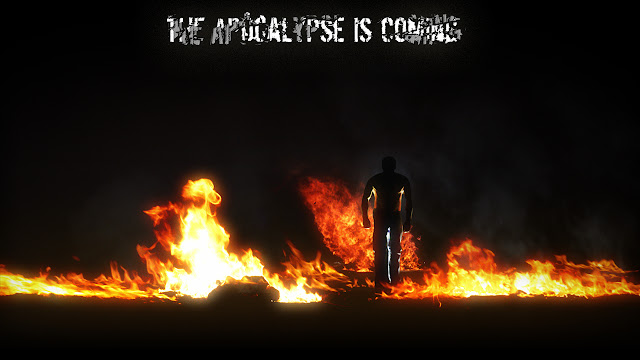
I had an inkling in my head of how I wanted the trailer to come across, and set about building the layout up in After Effects.  The first part was easy, simple intro playing off the theme idea for "Zombie" and end of the world theme: a cinematic optical flare with dust flying around in the air, as the camera pans downward to reveal a world in flames, with someone rising slowly in them.  At this moment I purely just jotted down the idea to come back to later on and try to tackle how I would build it.

Once some quick motion graphics were roughed out I had to plan out the rest of the trailer segments. I needed a "script".  What do I want the commercial to say?  What am I getting across?  Quick tip: Always keep a notepad and pen on your desk for quick jotting down of ideas.  I actually prefer this for day-to-day use as I often will write and re-write TO-DO lists of things on my plate I want or need to get done.  This keeps down on clutter on my screen as I used to prefer the Sticky Notes utility that comes with Windows 7.

As I built the trailer I went through about 3 versions of the script as I expanded on the content to fill 60 seconds of play.

There are a lot of video elements that are layered together and the hardest and probably the most complex part was the fire man segment with me standing up in the flames.  The first thing I built was the flame sequence.  Many video layers placed in 3d space within After Effects, along with separate smoke elements.

Once I got the rough camera motion down and timed everything out. I figured the opening sequence should take a total of 20 seconds even, and the fire segment making for a total of 7 of those seconds.

Timing has to match perfectly, and when it came time to shoot the plate I rallied in my favors I had been doing for the Mok family and they happily provided the lighting equipment and backdrop stands.  Mok and I went shopping for a backdrop cloth that I could use to block out the exterior location from my shot (I shot outside in front of my house at night).

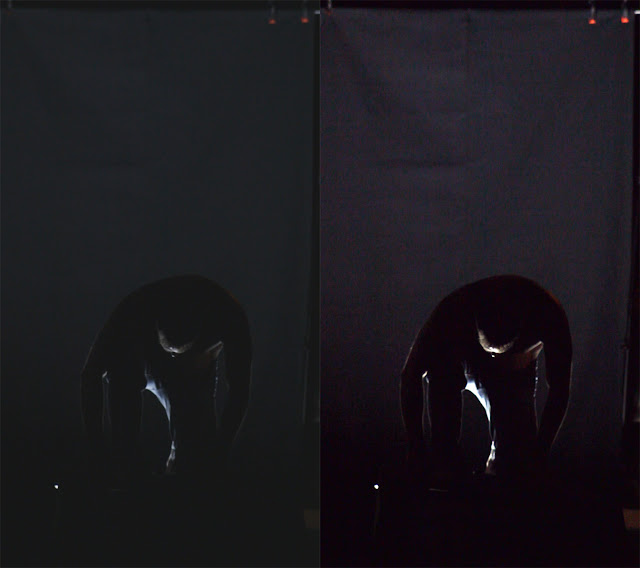
I called in another favor to a good friend of mine Tomas who let me borrow his DSLR as backup (which I ended up using as Troy's was having issues).  Michael Mok & I started setting up at about 9:30 pm.  You can see the setup below in the raw capture on the left and Photoshopped on the right.

Just a quick run-down of the "stage" layout: 

For the stage itself we used a cutting desk in the garage that has collapse-able sides and layed it on it's side, but that alone still wasn't tall enough to hide the softbox from the camera, so I grabbed two 2x4x8's that we had laying around because Troy and I have been busy building him a custom desk.  These raised it enough and kept it steady when I stood on it so it would not move.  

The black cloth I got just over 9 yards of in length and came at a decent width of 60".  This worked out perfectly as the backdrop stands we ended up having raised about 8+ feet in the air to cover not only my height for the angle of the camera but also accommodate the fact that the stage was increasing that height.

We did 3 sets, the first set of takes we brought inside immediately to ingest into After Effects to see how the footage looked.  I immediately noticed just how bad of camera shake there was even on a tripod.  As you can see from the screen grabs above we shot the footage vertically to maximize the use of space in the footage, which meant we couldn't use Mok's solid production tripod and instead had to shoot with a cheaper tripod.  It was windy out that night, and that coupled with a DSLR that weighs more than the tripod holding a camera vertically meant it would shake easily.  

Normally this kind of wind shake wouldn't be noticeable for a standard kit lens, but we were shooting with an older Canon EF 75-300mm that I borrowed from my older film canon SLR.

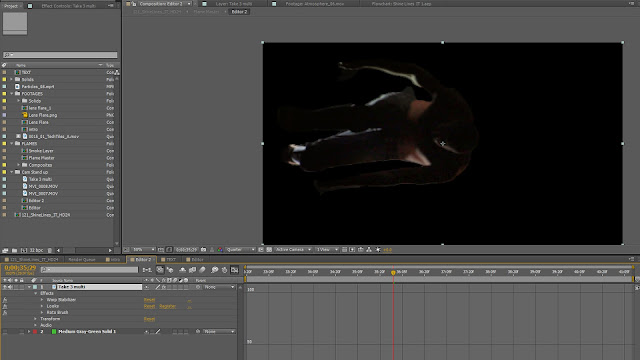
The last take on the last set was the final pick I ended up using to build the composition with in After Effects.  The first step was selecting out the clip segment I would use in the timeline and trimming out the rest, then warp stabilizing the footage.
The Rotobrush was then used to comp out the background.  This took quite a bit of work as I manually went in on a lot of the frames to get close to the look I wanted making sure the brushing worked to my advantage and wasn't too crisp or too blurry letting in any background.
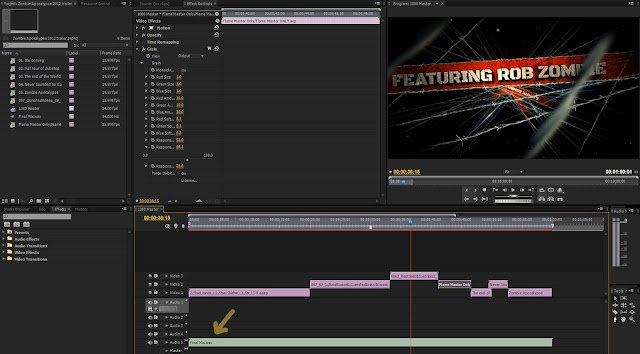
In Premier Pro you can see how the final timing of the sequence looks.  Notice only 1 audio track which says final mix. 
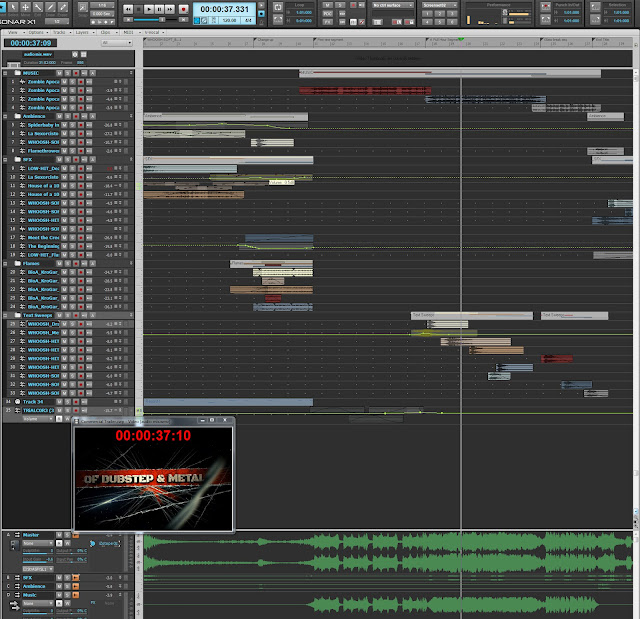
What I normally do with Premier is export out to OMF whatever audio is in my sequence if i'm working with video files that have audio (DSLR's, or synced Zoom H4n handheld recorder samples).  In this case, I simply render a WMV at 720p low quality but decent enough to work in Sonar with.
By the time I got down to doing the final iteration with the last after effects segment I had built, and dropped into the timeline, the project was unwieldy and premier and After Effects would be really slow to respond a lot of the time so I only had my previous audio mixing render to work from which remained blank.

This left some guess work to the timing.  And unfortunately, it takes almost as long to build preview renders with in premier pro to at least see if audio and video sync and i was just trying to wrap it up and get it online.

If I had all the time in the world to put into making it there are definitely things I would go back and refine but overall this was a solid 2, maybe 3 days of work comfortably I managed in my free time across 3 weeks.  And now, back to remixing!

Still to come: A commercial campaign I worked on in May will be published shortly as well as a behind the scenes reel so keep an eye out for more updates as there will be a couple of posts about it here as well.  Then, another commercial spot I worked on is out for VFX right now, but once that one is published I'll have a segment on that too.

Several other projects in the works, building a demo reel for a model and actress friend of mine. On a side noteI recently did music and audio post for this little preview:
Yuki Noguchi who I worked with back in January also shot the ACE Rail commercial, did an excellent job on this!  The clients wanted something a little more energetic and building motion to what was happening on picture than the temp music they had.

Lastly, I will be resuming and finishing up the RPM challenge episodes (3 left) for our studio's channel, as well as building a behind the scenes documentary for the Ace Rail commercial mentioned above.  Lots of stuff coming!